gThumb 4.0 Alpha: A Modernized Image Viewer with GTK4 and Libadwaita
Introduction
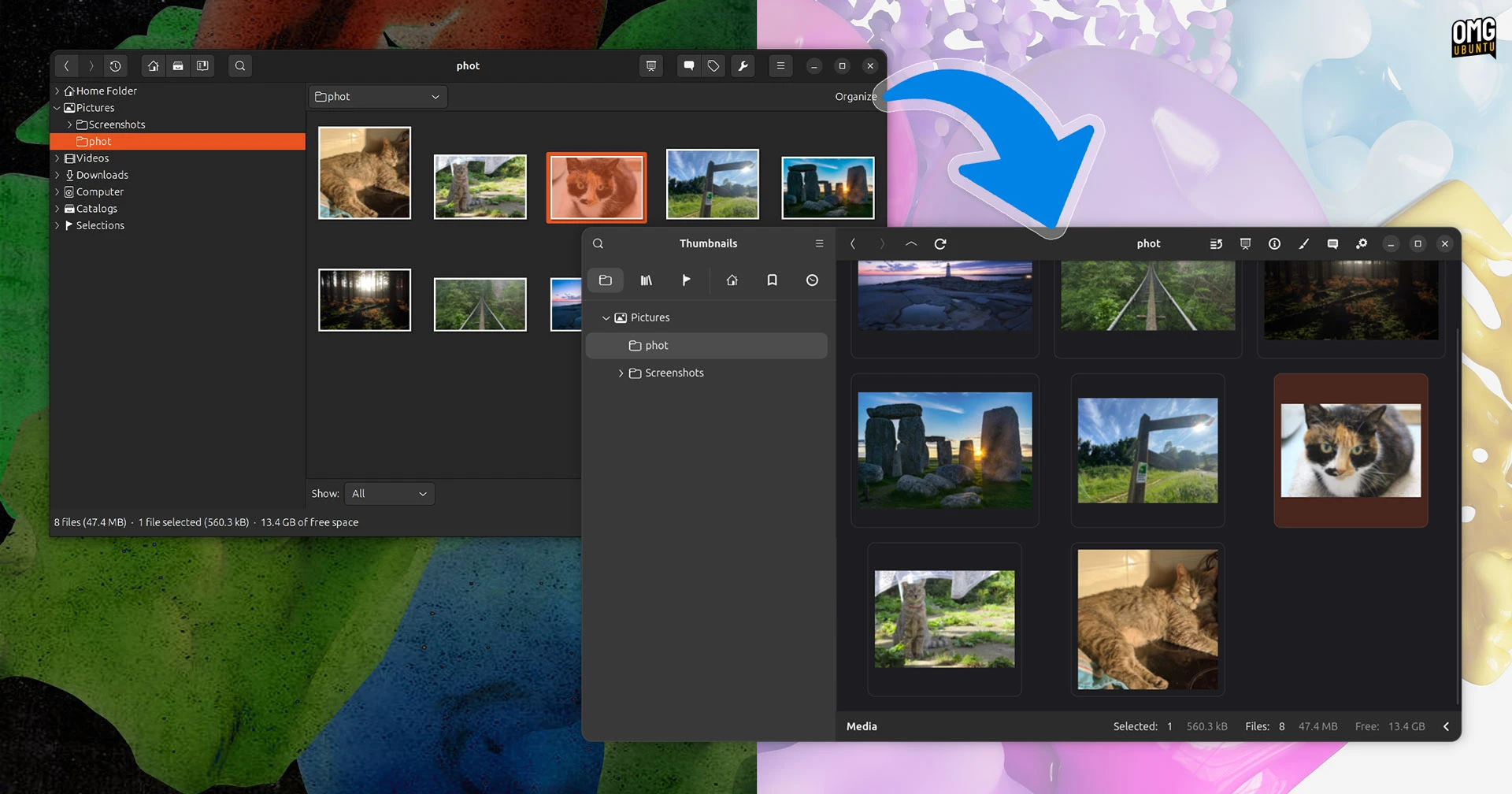
The open-source image viewer and organizer gThumb is undergoing a major transformation. Its latest alpha release, version 4.0, has been completely rewritten in Vala and ported to GTK4 and Libadwaita. The result? A user interface that is almost unrecognizable compared to its predecessor. But under the hood, this update brings far more than just a fresh coat of paint. Let's dive into what makes gThumb 4.0 a significant leap forward.

A Complete Visual Overhaul
The most striking change in gThumb 4.0 is the shift from GTK3 to GTK4 and Libadwaita. While any GTK port injects a dose of modernity, gThumb’s redesign goes deeper. The developers have rethought the entire interface, aligning it with contemporary GNOME design principles. Buttons, toolbars, and panels have been streamlined; the familiar clutter of older versions is replaced by clean, adaptive layouts that feel at home on both desktop and mobile screens.
This isn’t just about looking modern—it’s about feeling modern. The Libadwaita integration ensures consistent styling with other GNOME applications, and the transition from GTK3’s theming system to Libadwaita’s style sheets gives gThumb a unified, polished appearance. Even longtime users will need a moment to orient themselves; the app icons, navigation pane, and even the progress bars have been redesigned.
What Changed in the UI?
- Sidebar redesigned: Folder and archive browsing now uses a tree view with improved sorting and search.
- Toolbar simplified: Frequently used actions are grouped into a single adaptive toolbar that hides less common options under a hamburger menu.
- Thumbnail grid: The thumbnail view now supports variable sizes and a smoother zoom.
- Color scheme: Dark mode and light mode are fully supported out-of-the-box, and Libadwaita’s accent color theming is applied.
New Features and Format Support
Beyond the visual refresh, gThumb 4.0 introduces several practical capabilities. The alpha build brings native support for WEBP and PNG animations—a long-requested addition for anyone who works with modern web formats. You can now view animated stickers, short clips, or web-optimized images without needing external converters.
Export functionality has also grown. gThumb 4.0 lets you save images in the JXL (JPEG XL) format, a next-generation codec that offers better compression and quality than traditional JPEG. This makes it easier to future-proof your photo library and share high-quality images with minimal file size.
The Censor Filter
Privacy-conscious users will appreciate the new censor filter. It allows you to pixelate or blur specific regions of an image directly from the viewer. This is handy for hiding sensitive information (like faces, license plates, or personal data) before sharing screenshots or photos online. The filter works on the fly and supports adjustable blur radius and pixelation levels.
Alpha Testing and Availability
The gThumb 4.0 alpha is currently available for testing. You can download the source code from the official repository or check your distribution’s package manager for prebuilt binaries. Note that this is an alpha—some features may be buggy or incomplete. The developers warn that the transition from GTK3 to GTK4/Libadwaita was extensive, so many plugins and third-party integrations may not yet work.
If you want to try it out, the recommended method is to build from source using Meson and Ninja. Flatpak and Snap packages are expected to follow once the beta stabilizes.
What’s Missing?
- Plugin support is temporarily disabled; the developer plans to revive it in a later milestone.
- Some keyboard shortcuts from gThumb 3.x have changed or been removed.
- Performance on older hardware may be lower due to increased GPU usage from Libadwaita animations.
Conclusion
gThumb 4.0 is more than a simple port—it’s a reimagining of what an image viewer can be in the modern Linux desktop era. The visual overhaul brings it in line with GNOME’s latest design language, while new features like WEBP animation support and the censor filter add real value. If you’re willing to brave the alpha stage, you’ll get a sneak peek at the future of one of Linux’s most beloved image management tools. Stay tuned for the stable release later this year.
Originally reported on OMG! Ubuntu. Reproduced with permission.
Related Articles
- 10 Key Reasons Behind Meta's Layoffs (According to Mark Zuckerberg)
- 7 Things You Need to Know About April's Linux and Open-Source Developments
- 7 Key Highlights of Fedora Asahi Remix 44 for Apple Silicon Macs
- 6 Key Highlights of Fedora Asahi Remix 44 for Apple Silicon Macs
- Kubernetes v1.36 GA: Pressure Stall Information (PSI) Metrics Now Stable for Production Workloads
- BleachBit Launches Interactive Text Interface for Headless Server Cleaning
- Linux Weekly Roundup: Standardized Projects Folder, Firefox Ad Blocking, and Major Distro Releases
- Fedora Linux 44 Pre-Release Virtual Party Set for April 24—Community Celebration Goes Live Ahead of Final Launch