Securing Windows Environments: Eliminating Static Credentials with Boundary and Vault
Many organizations still rely on outdated authentication methods for Windows systems, leaving them vulnerable to credential theft and lateral movement. This Q&A explores how combining HashiCorp Boundary and Vault can replace static credentials and broad VPN access with identity-based, dynamic access controls.
What persistent credential problems affect Windows environments?
Despite advancements in secrets management, Windows environments commonly use static credentials such as shared local admin accounts, long-lived domain accounts, service accounts with fixed passwords, and manually provisioned privileged credentials. These are rarely rotated due to manual overhead, remaining valid for months or even years. This creates a high risk of exposure if credentials are compromised. Additionally, many organizations still rely on multi-factor authentication at login but underneath use static passwords that are reused across sessions, leaving a hidden vulnerability. Shared administrative accounts for RDP, troubleshooting, or break-glass scenarios multiply the risk.
Why do static credentials remain a major security risk?
Static credentials are a persistent risk because they are often shared, long-lived, and rarely rotated. In Windows environments, local administrator accounts or domain accounts with privileged access are frequently used by multiple team members, making it impossible to trace actions to a specific user. If a credential is stolen, the attacker can move laterally across the network undetected. Even with MFA, the underlying static password can be reused or sold. Without automated rotation, these credentials become a ticking bomb for CISOs, DevOps, and security teams.
How do traditional VPNs fail to control access effectively?
Traditional VPNs follow a castle and moat model: they secure the perimeter but grant broad network access once inside. Limiting lateral movement becomes complex, requiring firewalls, security groups, and network segmentation that rely on IP addresses rather than user identity. In modern cloud environments where IPs are dynamic and ephemeral, this approach breaks down. Additional tools are needed, leading to operational sprawl. VPNs solve connectivity, not user-to-resource access control. Organizations need a solution that ties access directly to identity, not network location.
What is the better model offered by Boundary and Vault?
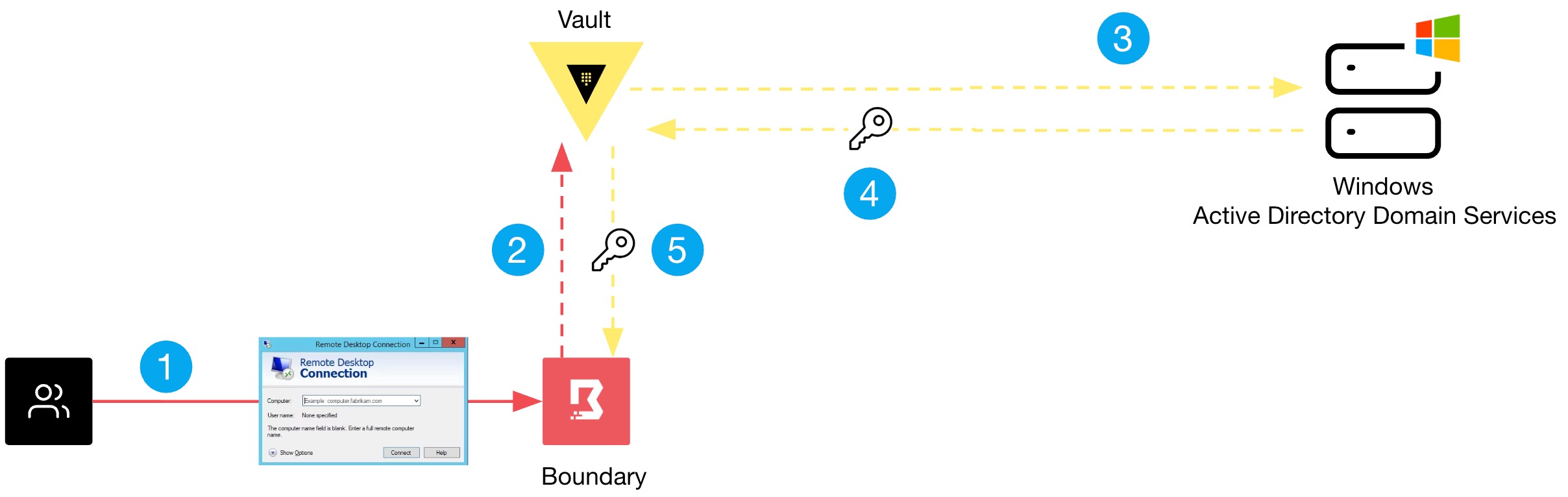
Boundary and Vault provide a fundamentally different approach: identity-based access and dynamic credential management. Instead of granting broad network access, Boundary brokers a direct, session-based connection between a user and a target Windows machine based on the user's identity and authorization policies. Vault generates ephemeral credentials (e.g., time-limited passwords or SSH keys) that are used only for that session. This eliminates static credentials and reduces the attack surface. The combination ensures that users never see or reuse long-lived passwords, and access is automatically revoked after the session ends.
How does Boundary combine authentication and authorization on one platform?
Boundary unifies authentication and authorization into a single control plane. When a user requests access to a Windows server, Boundary verifies the user’s identity via an external identity provider (e.g., Okta, Azure AD) and then checks authorization policies that define which resources the user can reach. Once authenticated and authorized, Boundary establishes a secure, proxied connection directly to the target, bypassing the need for VPN. This single platform replaces multiple disparate systems (VPN, bastion hosts, credential vaults) and provides a single audit trail for every session.
How does Vault handle credentials on behalf of users?
Vault integrates with Boundary to dynamically generate and rotate credentials for Windows targets. Rather than storing static passwords, Vault creates short-lived, unique credentials for each session. For example, when a user needs to RDP into a Windows machine, Vault can generate a temporary local administrator password that is valid only for that session. The user never sees the password; Boundary injects it into the session automatically. This eliminates the risk of credential sharing, password reuse, and exposure. After the session ends, Vault rotates or destroys the credential, ensuring no lingering access.
What configuration steps are needed to test Boundary and Vault?
To test Boundary with Vault for Windows credential management, deploy Boundary in your environment (using Docker or a binary), set up a Vault server, and enable the Vault credential store plugin for Boundary. Configure a target (Windows machine) in Boundary, and create a credential library in Vault that generates local admin passwords. Then define authorization policies in Boundary to allow specific users to access the target. Finally, initiate a session via Boundary’s CLI or UI; the system will automatically retrieve a Vault-generated credential and establish the connection. Detailed steps are available in HashiCorp's documentation.
How do Boundary and Vault eliminate static credentials entirely?
By replacing static passwords with dynamic, session-bound credentials. In this model, no long-lived credential is ever stored on disk or memorized by users. Every access request triggers Vault to create a fresh, time-limited credential that is used only for that session. Boundary ensures the credential is only provided to the authorized user and never exposed in plain text. This approach eliminates the risks of shared accounts, credential silos, and manual rotation. It also simplifies audits because each session can be traced to a unique identity and credential.
Related Articles
- Shielding Medical Infrastructure: A Tactical Guide to Wiper Attack Defense Inspired by the Stryker Incident
- ClickFix Campaigns and Vidar Stealer: What You Need to Know
- Cybersecurity Threats: A Deep Dive into Q1 2026 Exploits and Vulnerabilities
- Active Malvertising Campaign Targets Mac Users Through Google Ads and Claude.ai
- Critical Linux Security Patches Released for AEAD Socket Vulnerability Across Seven Kernel Versions
- Meta Unveils Major Security Upgrades for Encrypted Backups: Over-the-Air Key Distribution and Public Deployment Audits
- Navigating the Evolving npm Attack Surface: Threats and Mitigations
- Software Supply Chain Under Siege: AI-Driven EDR Thwarts CPU-Z Malware Delivery via Trusted Vendor Domain