Streamlining Python Development: The New Environments Extension for VS Code
A Unified Environment Experience
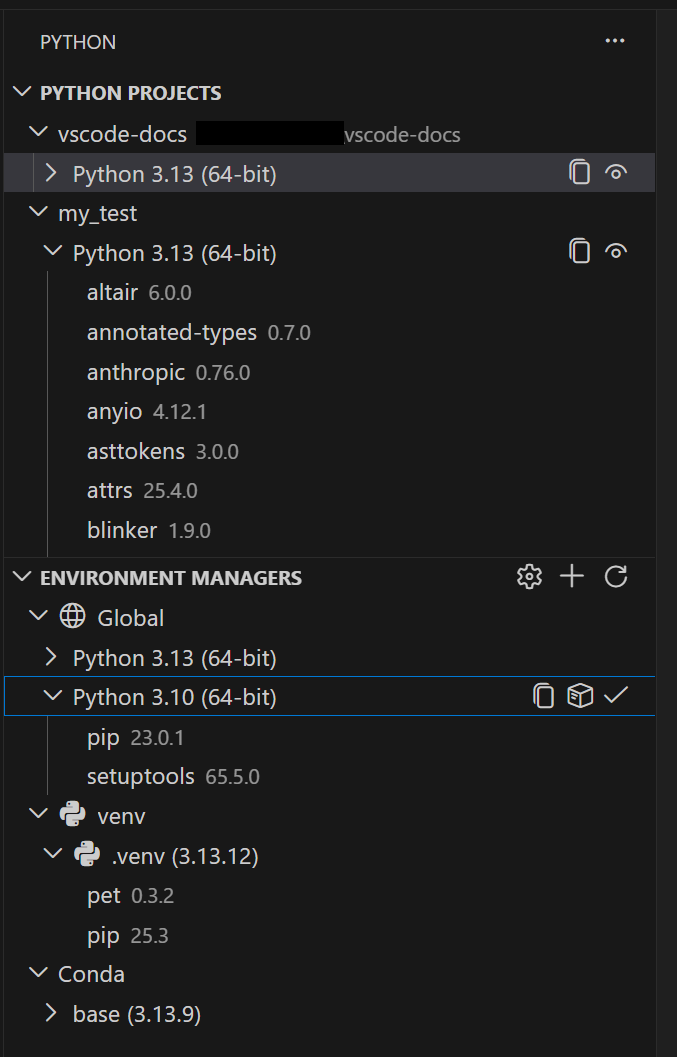
Python development in Visual Studio Code has taken a significant leap forward with the general availability of the Python Environments Extension. After a year in preview and extensive community feedback, this extension brings consistency and clarity to managing Python environments, interpreters, and packages. It consolidates tools like venv, conda, pyenv, poetry, and pipenv into a single, streamlined workflow. Users can opt in immediately by setting python.useEnvsExtension to true, or wait for the automatic rollout over the next few weeks. The extension works seamlessly alongside the existing Python extension and requires no setup—simply open a Python file, and your environments are discovered automatically.
Automatic Discovery Across Platforms
The extension automatically discovers environments from all major managers, including:
- venv
- conda
- pyenv
- poetry
- pipenv
- System Python installations
This discovery is powered by PET (Python Environment Tool), a fast Rust-based scanner that finds environments reliably across Windows, macOS, and Linux. PET checks your PATH, known installation directories, and configurable search paths to ensure nothing is missed. It's the same proven engine already used in the standard Python extension, now with a dedicated UI. From a single interface, you can create, delete, switch, and manage environments regardless of which tool originally created them.
Configuration for Non-Standard Locations
For most users, the extension works out of the box. If you keep environments in custom directories, you can configure workspace-level search paths using glob patterns, or set global search paths for shared directories outside your workspace. This flexibility makes it easy to adapt to any project structure.
Faster Environment Creation with uv
If you have uv installed, the extension automatically uses it for creating venv environments and installing packages. uv is significantly faster than standard tools, especially in large projects with many dependencies. This behavior is enabled by default via the python-envs.alwaysUseUv setting.
Quick Create: One-Click Environments
Getting a new environment up and running is now just a click away. The Quick Create button (the + icon in the Environment Manager's view) builds an environment using your default manager and the latest Python version. It also installs any workspace dependencies found in requirements.txt or pyproject.toml. In seconds, you have a working environment ready for development.

Custom Create: Full Control When Needed
When you need more granularity, Custom Create (accessed via Python: Create Environment in the Command Palette) lets you choose your environment manager, Python version, environment name, and which dependency files to install from. Both venv and conda support creating environments directly from VS Code. For other managers like pyenv, poetry, and pipenv, the extension discovers environments you create using their respective CLI tools—ensuring your workflow remains uninterrupted.
Python Projects: Environments That Match Your Code Structure
The extension introduces Python Projects, a feature that maps environments to specific folders or files. This solves common challenges in monorepo setups, where different subdirectories may require different interpreters, packages, or environment configurations. By linking an environment directly to a folder or file, you ensure that each part of your codebase uses the correct dependencies without manual intervention.
For example, if you have a monorepo with separate frontend and backend folders, each requiring distinct Python versions, you can assign a dedicated environment to each. The extension automatically activates the right environment when you open a file in that folder. This eliminates version conflicts and reduces the cognitive overhead of managing multiple environments manually.
Conclusion
The Python Environments Extension for VS Code represents a major step forward in simplifying Python development. By unifying environment management, offering fast creation with uv, and providing flexible project- to-environment mapping, it removes friction that has long plagued developers. Whether you're working on a single script or a large monorepo, this extension ensures your environments are consistent, fast, and easy to manage. Explore it today by enabling the setting and experience a more streamlined Python workflow.
Related Articles
- Cloud-Dependent Apps Found Vulnerable: Developer Urges Shift to Local-First Architecture
- CANopenTerm: A Terminal-Based Power Tool for CAN Network Monitoring and Analysis
- Master Dart CLI Development: Build and Ship Command-Line Tools
- Apple Vision Pro Lives On: Debunking Abandonment Rumors
- How to Spot and Avoid Rogue AI Browser Extensions That Steal Your Data
- Understanding the U.S. Fertility Decline: A Guide to Economic and Social Drivers
- Why Google Pixel's Automation Falls Short Against Samsung's Modes & Routines
- ACEMAGIC F5A Mini PC Gets Major Spec Boost with AMD Ryzen AI HX 470, OCuLink and Dual USB4 Ports