Android Quick Share Expansion: Which Devices Get AirDrop Support and Why Yours Might Be Left Out
Google recently announced a significant expansion of its Quick Share feature, which functions similarly to Apple's AirDrop. This update brings peer-to-peer file sharing to a broader range of Android devices, but not every phone is included. Here's everything you need to know about which devices are getting the new Quick Share AirDrop-style support and the reasons some models are being left behind.
What exactly is Quick Share and how does it compare to AirDrop?
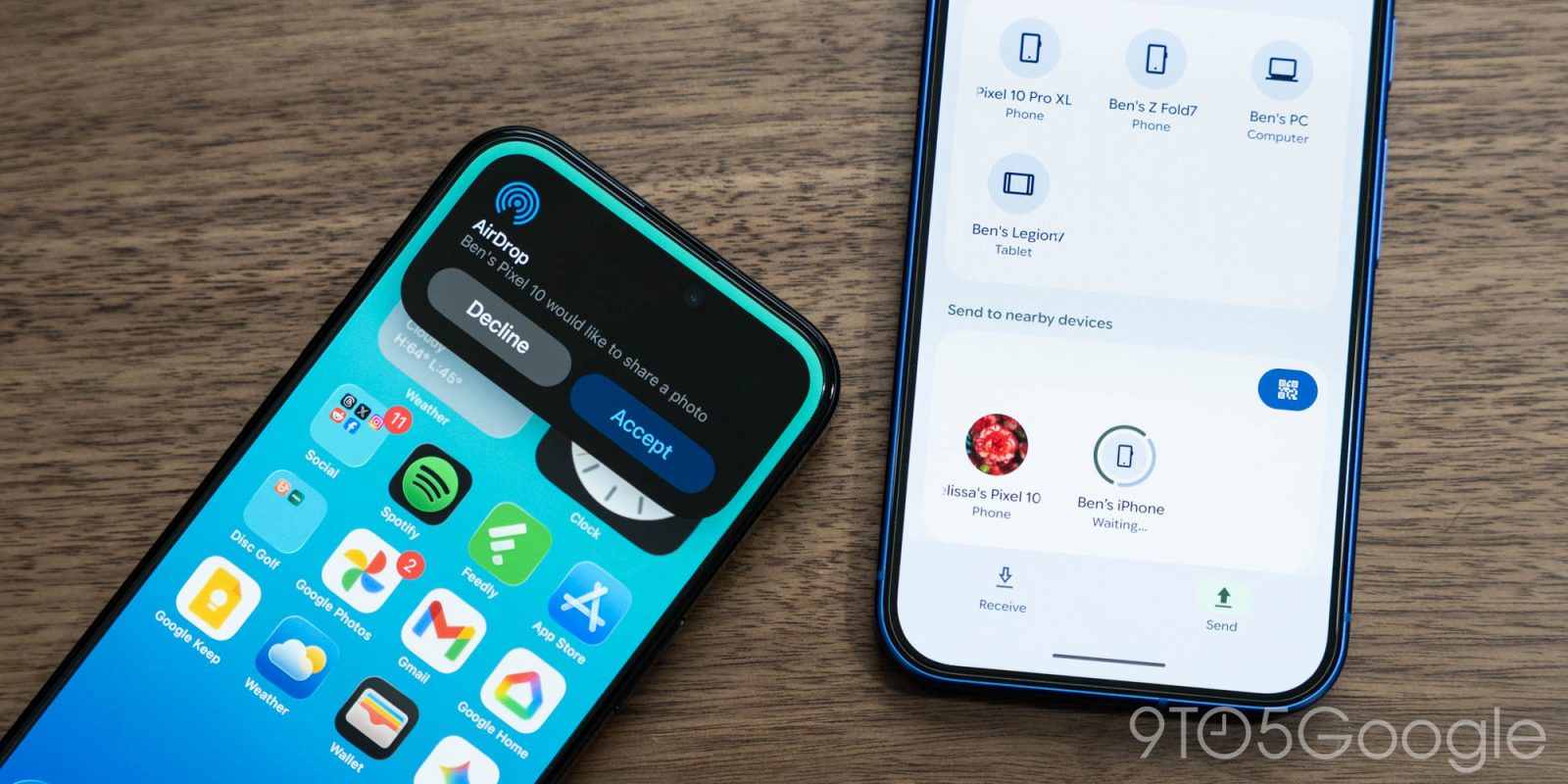
Quick Share is Android's built-in file-sharing protocol, introduced by Google and later adopted by Samsung. It allows users to instantly send photos, documents, and other files to nearby devices using a combination of Bluetooth and Wi-Fi Direct. The feature is designed to be as seamless as Apple's AirDrop, with automatic discovery and simple tap-to-transfer functionality. While AirDrop is exclusive to Apple's ecosystem, Quick Share works across Android phones, Chromebooks, and even some Windows PCs. The latest update brings improved compatibility and a dedicated sharing interface that mimics AirDrop's ease of use, making file transfers between Android devices faster and more intuitive than ever.
Which Android devices are confirmed to get the new AirDrop-like Quick Share update?
Google has released a preliminary list of devices that will receive the updated Quick Share with enhanced AirDrop-style capabilities. The list includes recent flagship models from major manufacturers: Google Pixel devices running Android 13 or newer, Samsung Galaxy S23 series, Z Fold 5, Z Flip 5, and select OnePlus, Xiaomi, and OPPO phones. However, the full rollout is expected to expand gradually. For complete details, refer to the official device list or check your phone's settings under Quick Share.
Why might my Android phone not receive the Quick Share AirDrop support?
Several factors can prevent your device from getting the new Quick Share features. First, hardware limitations – older devices may lack the necessary Bluetooth and Wi-Fi Direct components to support high-speed peer-to-peer connections. Second, software restrictions: the update requires at least Android 13, and many budget or older phones run outdated operating systems. Third, manufacturer decisions – not all brands have committed to integrating Google's latest Quick Share implementation, especially those with their own proprietary sharing tools like Huawei or Xiaomi. Finally, regional availability may also play a role, as some features roll out in phases across different countries.
What are the key features of the new Quick Share AirDrop functionality?
The revamped Quick Share introduces several improvements that bring it closer to AirDrop's polished experience. Users can now discover nearby devices automatically without manually enabling visibility. The interface shows a grid of available contacts, similar to AirDrop's circular icons. Transfer speeds have been boosted using peer-to-peer Wi-Fi, allowing files up to several gigabytes to be shared in seconds. Additionally, privacy controls let you set who can see your device: all contacts, selected contacts, or hidden. The update also integrates a progress indicator and notification, so you always know the status of your transfer.
Is Quick Share compatible with iOS devices or just Android?
Currently, Quick Share is designed primarily for Android devices, Chromebooks, and selected Windows PCs. There is no native support for iOS or iPadOS, meaning you cannot use Quick Share to transfer files directly to iPhones or iPads. However, Google has been exploring cross-platform solutions, and some third-party apps can bridge the gap. For Apple users, AirDrop remains the exclusive option. If you need to share files between Android and iOS, consider using cloud-based services like Google Drive or Dropbox as an alternative.
How can I check if my Android phone is eligible for the Quick Share AirDrop update?
To verify eligibility, open your phone's Settings app and look for Connected devices or Connection preferences. Find the Quick Share option – if it's present, tap it to see the latest features. If nothing appears, your device may not support the new AirDrop-like functionality. Alternatively, check the official Google Support page or contact your device manufacturer. You can also look for system updates: go to Settings > System > System update and install any available updates. Remember that even if your phone is on the supported list, the rollout may be phased, so patience is key.
Will Samsung's Quick Share be merged with Google's version?
Yes, Google and Samsung have collaborated to unify their sharing technologies. Starting with the latest update, Samsung's Quick Share is now the same as Google's version, replacing the previous separation. This means that Samsung Galaxy devices will seamlessly use the same protocol as other Android phones. The merger ensures that all supported devices can share files with each other without additional setup. Samsung has already begun rolling out this unified Quick Share on its One UI 6.0 and newer versions, making cross-brand file transfers simpler and more reliable.
Related Articles
- Plex Price Increases Confirm Jellyfin as the Superior Self-Hosting Choice
- Tech Roundup: Raspberry Pi Handhelds, Cross-Platform RCS Encryption, and a Foldable Logitech Mouse
- Data Normalization: Balancing Context, Clarity, and AI Governance
- YouTube Music's Foldable Interface Finally Delivers: How to Unlock the Optimal Layout
- Holographic Horizons: Inside the Rumored 'Spatial iPhone' and Next-Gen 3D Displays
- Google Unveils 'Googlebook' Project: Premium Chromebook Successor with Upgrade Path for Select Models
- React Native 0.79 Delivers Major Performance Gains and Tooling Overhaul
- Bringing React Native to Meta Quest: A New Era for VR Development